Demixing audio with Demucs
“Mastery of music is its own reward.” — Apollonius au Valii-Rath
I’ve always enjoyed playing the bass guitar. I spent countless hours listening to songs, playing along to my Jamiroquai albums until the blisters stopped me.
I also spent a good amount of time on YouTube watching bass covers. It was helpful to see how people play certain songs by looking at where they were fretting, which string they were plucking, what rhythm and patterns they were slapping, which neck position their hand was at, etc.
It got me pretty far as a bedroom bassist, and not to toot my horn, but I’m quite proud of my technique, timing, and overall groove I’ve developed over the years.
But there was one annoyance when it came to learning songs by ear. A lot of the time, it’s difficult to hear the bass. Sometimes the volume is just too low, or the bassline is getting lost in the mix, or there are just too many instruments playing at once to isolate the bass reliably with my own ears.
I spent years wishing there was some way of isolating the bass track from the other instruments to understand exactly what was being played.
The year is 2026. I’m a software engineer. This is a problem that can be solved with software, so it’s time for some coding.
Requirements
What I ideally want from my app are 3 things:
- Select a song: a local audio track file or a YouTube link to a song
- Separate the instrument tracks (with option to export)
- Playback for the separated tracks, with option to solo/mute each track
There are already apps that can do most of this. Moises.ai can do pretty much exactly what I want, plus a whole lot more. The only missing piece is the ability to feed a song straight from YouTube.
For me, downloading from YouTube is a high priority feature, since like most people these days, I use Spotify to stream songs. I no longer have a huge collection of songs on iTunes (something I’m considering going back to, but that’s a separate blog post), so feeding in local files means I’ll need to download the song first somehow before feeding it in to the app. But with the number of hours I am about to waste, this is something I want to automate to save a tiny bit of time and effort.
The other problem is that most of these services are subscription based. I hate subscriptions. I don’t want to rely on some cloud API. Free and local is the way.
How it works under the hood
There are several technical terms for isolating instrument tracks: Music Source Separation (MSS), Stem Separation, Demixing, etc.
Most of these use AI models trained to identify targets in mixes.
The AI is trained on huge collections of real recordings where the isolated parts (drums, bass, vocals, etc.) already exist.
The model learns the patterns: what a snare drum sounds like, what a bass guitar sounds like, how they tend to overlap in a mix. The model then estimates and produces these separated stems as output.
Early models were large and required server-grade GPUs to run, so cloud processing was the only option. Modern models are much more efficient, and consumer hardware has gotten pretty capable with running AI models, so I can run a bunch of them on my laptop without issue.
There are several open-source models available at the time of writing, and Demucs seems to produce the highest quality stem separation for my needs. It splits a track into 4 stems: bass, drums, vocals, other.
Demucs specifically works directly in the waveform domain, rather than on spectrograms alone. In practice, this means the separated stems sound more natural and suffer fewer of the “watery” artifacts you hear from older tools.
There is a 6-stem version available, which adds guitar and piano stems, but the separation was not working as reliably.
The pieces
Going back to the requirements, these are the tools that will do the heavy lifting:
The rest can be hand-rolled. I decided to tackle this in 2 phases.
The first phase is getting the processing pipeline working. A YouTube URL goes in, yt-dlp downloads the audio, ffmpeg normalises it to a WAV file, and demucs splits it into 4 stems. The full chain looks like
this:
YouTube URL → yt-dlp → ffmpeg → source.wav → demucs → stems/{bass,drums,vocals,other}.wavThe goal of this phase: export stems with a YouTube URL as the only input.
The second phase is the playback feature. For practice purposes, I don’t always want to be loading tracks into a DAW because of the extra effort and time. I just need a simple interface to control playback so that I can practice along the drum track of a song, or isolate the bass to figure out exactly what was being played.
That being said, one thing to keep in mind is that I still do want to use this software to export the stems to a DAW like GarageBand for recording purposes. For this, a desktop app is the way to go.
Stack
For a desktop app, there are a bunch of options to pick from. I wanted to cross-compile to macOS, Windows, and Linux, and keep the result light and quick. Viable options that came to mind were Electron and React Native. I didn’t like the idea of writing JavaScript for the whole app though. I then came across Tauri.
“Tauri is a framework for building tiny, fast binaries for all major desktop apps”
That was exactly what I needed. UI is created with HTML/CSS/JS, and the logic layer is written in Rust. I had never written Rust before, but it had been on my list of languages to learn, so this felt like the right excuse.
The project structure ended up looking like this:
project root/
├── core/src/             # Rust (Tauri backend)
│   ├── commands.rs
│   ├── db.rs
│   └── pipeline/
│       ├── download.rs   # yt-dlp
│       ├── stems.rs      # demucs
│       └── analysis.rs
├── ui/                   # Svelte frontend
│   └── lib/
│       ├── AddTrack.svelte
│       ├── TrackList.svelte
│       └── Playback.svelte
└── python/               # Demucs sidecar
The application orchestrates the following pipeline:
Source audio file (URL or file) → yt-dlp / ffmpeg (download + convert to WAV) → demucs (stem separation) → SQLite (track metadata)
┌─────────────────────────────────┐
│   UI (Svelte / Web Audio API)   │
└────────────┬────────────────────┘
             │ Tauri commands / events
┌────────────▼────────────────────┐
│   Rust core                     │
│   pipeline · SQLite · setup     │
└──────┬───────────┬──────────┬───┘
       │           │          │
    yt-dlp      ffmpeg     demucs
These are long-running subprocesses, so Rust’s tokio async runtime handles them without blocking the UI thread. The binary size is small, and startup time is in milliseconds, lighter and faster than Electron.
Rust’s role here is narrower than it might appear. The heavy lifting lives entirely in the subprocesses: Demucs is Python-based like most ML tools, and yt-dlp and ffmpeg are command-line tools. Rust handles concurrent subprocess management, proper cancellation when the user removes a track mid-pipeline, and guaranteed temp-file cleanup when things go wrong. This is where Rust earns its keep, and where a Node-based solution would start to feel uncomfortable.
Implementation
It was much smoother than I expected. With a fair bit of help from Claude, I was able to string together the first MVP very quickly, followed by the playback feature. There’s something deeply satisfying about your vision and plan coming together that fast.
A few pieces were more interesting to implement than expected.
Progress streaming
The pipeline runs in the background while the user can keep browsing the library. Each stage (download, stems, analysis) emits a Tauri event with the shape { track_id, stage, status, message }. The frontend subscribes once on mount and maintains a progress map keyed by track_id, so multiple tracks can process concurrently with independent progress bars. No polling, no database reads mid-pipeline.
Playback synchronisation
Getting four independent audio tracks to play in perfect sync is trickier than it sounds. All four AudioBufferSourceNodes are started with the same start(0, offset) call in the same JavaScript tick. Current playhead position is computed as startOffset + (audioCtx.currentTime - startTime), using the Web Audio clock rather than wall time. Gain changes on mute/solo use setTargetAtTime with a short exponential ramp to avoid the click you’d get from an instant value change.
Distribution and the macOS quarantine problem
Bundling Demucs inside the app was never realistic: the Python environment alone weighs around 2GB. Instead, the app downloads a pre-built sidecar binary on first launch. The download streams bytes and accumulates a SHA256 hash in parallel, only moving the file into place after it matches a known checksum. On macOS, there is one more step: Gatekeeper will block any downloaded binary unless you strip the quarantine attribute with xattr -d com.apple.quarantine. Unfortunately I’m too stingy to pay Apple $99 USD per year for the privilege of being an identified developer.
Crash recovery
If the app quits mid-pipeline, any track stuck in pending state would show a frozen progress bar forever. On startup, a single SQL update flips all pending stages to error before the UI renders. This is a small detail with a large quality-of-life impact.
Final product
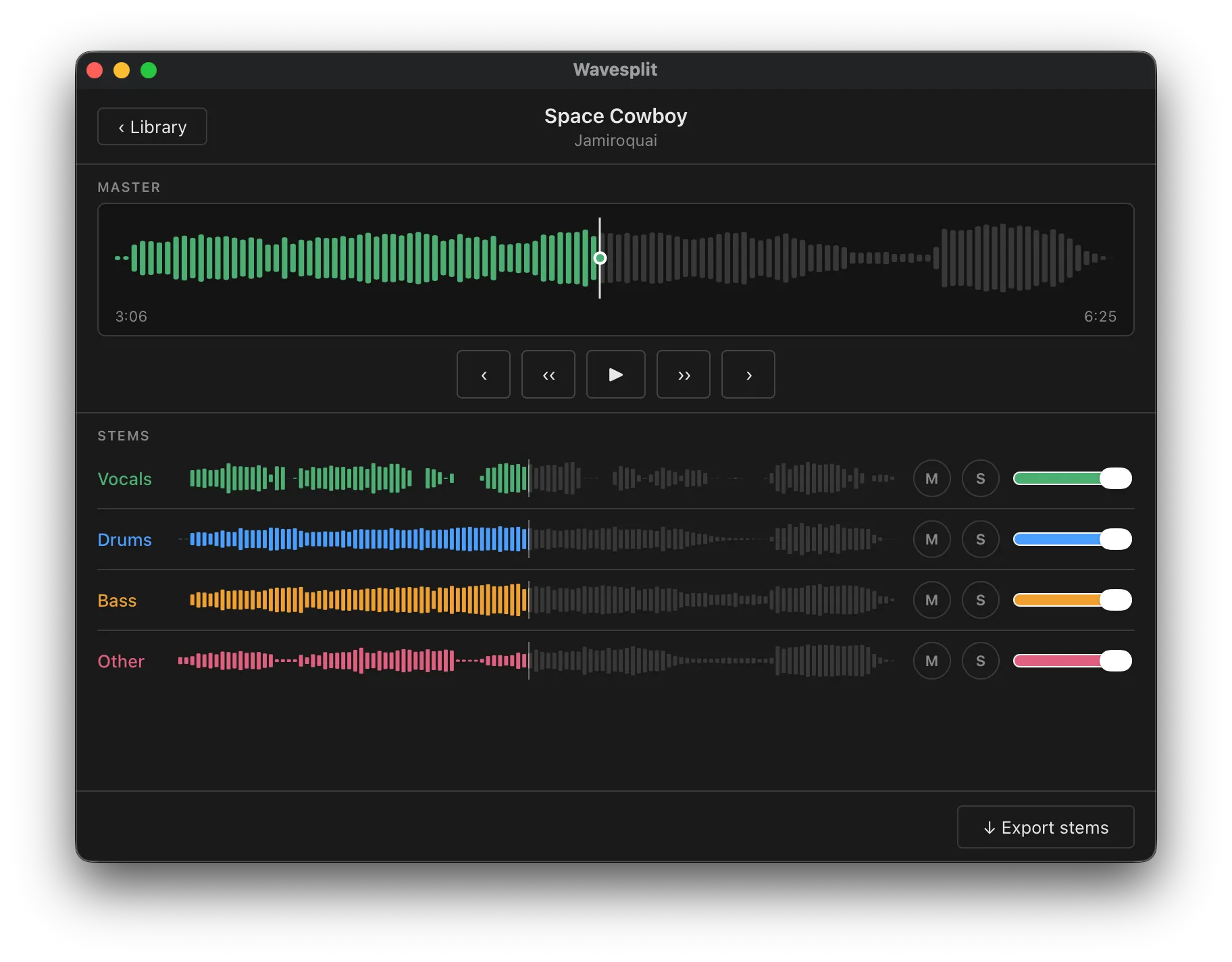
And here it is. The name is Wavesplit (though this may change in the future). I’ve been using this app daily to practice along to many songs: isolating the bass track to transcribe it, playing along with just the drum track, and recording covers of some of my favourite artists. When I want to export stems into GarageBand for a proper recording session, that workflow is just one click away.
Wavesplit is something I initially built only for myself, but I’m glad to say it’s also available for anyone who wants to give it a go, thanks to Tauri’s cross-platform support.
Here’s the repo for Wavesplit. Head to the releases page and download a binary for your system.
Future plans
At this point, I’ve implemented all the features I initially wanted. The next things on my list are beat/bar grid detection and bass note transcription, which would let the app highlight what’s being played on the neck in real time. Chord detection is further down the road. All of it would be precomputed during the analysis stage, so playback stays fast and there’s no ML running during practice.
But anyway, back to jamming along to Light Years by Jamiroquai 🎸